 Pipe
Pipe looks after your Linux server and messages you when something breaks
It is an AI agent that runs on the server itself. When something goes wrong, it tells you on Telegram, finds the cause and fixes it. A restart or a config change it does on its own, with a backup and a check before and after. Before it deletes data or touches SSH, it asks you.
git clone https://github.com/Kvmyk/pipe && cd pipe
sudo bash scripts/install-server.sh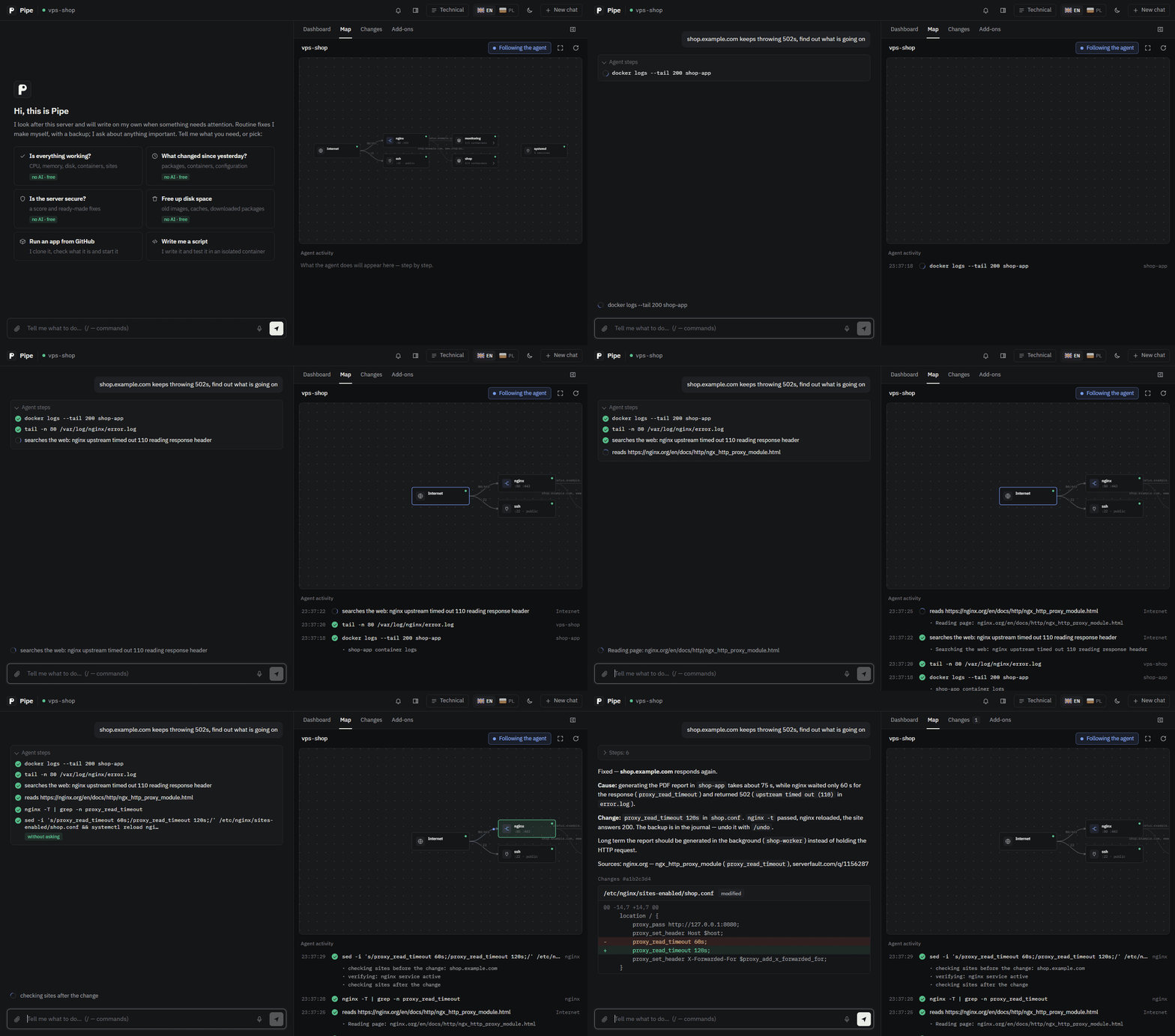
pipe web). Recorded from a scripted demo session.What it does on its own, and what it asks about
Whatever the model proposes passes a classifier first. The rules sit in Pipe's code, outside the model, so the model cannot talk its way around them.
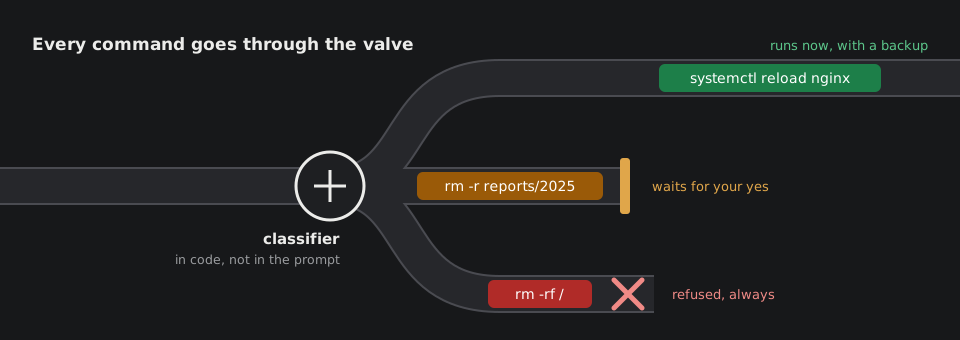
On its own
reads, and routine changes with a backup and a check
- logs, processes, disks, configuration, the web
- restarting and reloading services and containers
- editing configs (backup,
nginx -tbefore, a check after) - packages from the system repository
docker compose up,git pullfrom origin
After your yes
what it cannot back up or undo, and every unknown command
- deleting data, volumes, packages
- SSH, users, firewall, cron, systemd units
- app code, Dockerfiles,
docker run - files with secrets (
.env, keys) - sending data outside the server
Never
refused no matter who asks
rm -rf /and its variantsmkfs,dd,wipefson disks- writing to
/etc/shadowand/boot - downloading and running scripts (
curl … | sh)
What working with Pipe looks like
You write in plain language. The agent picks the commands, reads logs and configuration, and searches the web when it doesn't know something. Below: 502 errors on a shop, then a request it will not carry out alone.
- docker logs shop-app
- tail -n 80 /var/log/nginx/error.log
- searches the web: nginx upstream timed out 110
- reads nginx.org: ngx_http_proxy_module
$ sed -i 's/proxy_read_timeout 60s;/proxy_read_timeout 120s;/' /etc/nginx/sites-enabled/shop.conf && systemctl reload nginx
- backup: /etc/nginx/sites-enabled/shop.conf
- before: nginx -t passed
- after: nginx runs, sites respond as before
Fixed, shop.example.com responds again. The PDF report takes about 75 seconds to generate, while nginx waited
only 60 for a response (proxy_read_timeout). I raised the limit to 120 seconds. The backup is in
the journal; undo it with /undo.
$ rm -r /srv/shop/reports/2025
- 2,140 files, 3.8 GB
- after deleting there is no copy to restore
A pipe between you and your server
The valve is one of three fittings on a longer pipe. Everything you ask for goes through it, and everything the server has to tell you comes back the same way, alerts included.
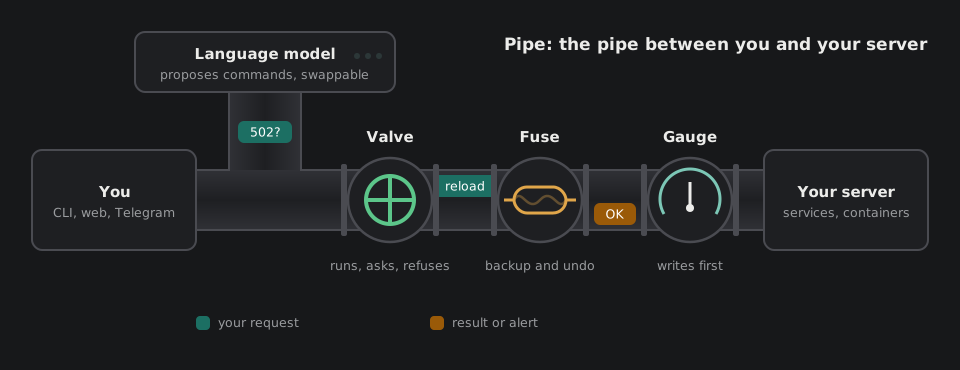
| Valve | Decides what passes, by the rules above. |
|---|---|
| Fuse | Takes a backup before a change and checks the result after it. If a config check fails, the old version goes back. /undo reverses the rest. |
| Gauge | Reads the server every two minutes, without a language model. When a reading is wrong, Pipe writes to you first. |
The model comes up with what to do, and Pipe decides what actually runs. That is why the model sits before the valve. It is a part you can swap: Gemini, Claude, OpenAI or a local Ollama. The rules, the memory and the tools stay in Pipe. Engineers call this layer around a model a harness.
Where you talk to it
The backend runs on the server. Clients connect to it through an SSH tunnel, so no port has to be opened on the server.
| Terminal | The pipe command on your computer (Windows, macOS, Linux). You see every command
and a few lines of its output; confirmations show the command and the safety plan; diagrams are saved as PNG. Attach a file with @path. |
|---|---|
| Browser | pipe web opens the conversation next to a map of the server that shows where
the agent is working. Every change has a diff preview and an undo button. Paste a screenshot into the
conversation, or ask by voice with the microphone. |
| Telegram | Alerts, reminders and the morning report arrive here, with an "Investigate" button on alerts. You can send a voice note, a photo or a log file (voice works out of the box with Gemini, OpenAI and Groq). |
What else it does
- Watching at no cost
- Every two minutes it checks disks, memory, load, containers and new ports open to the internet. These checks run without a language model, so they cost nothing.
- Knows what changed
- Every hour it records the server state: packages, container images, ports, cron, accounts and configs. "What changed since yesterday?" gets an answer with the time.
- Monitoring without setup
- It finds domains in the nginx, Caddy and Traefik configuration by itself and watches certificates, site responses, DNS and backup freshness.
- Security audit
/auditscores the server 0–100: SSH, firewall, databases exposed to the internet, accounts, updates. Every finding comes with a ready fix.- Many servers
- Remote machines (SSH), containers and Kubernetes clusters are added as targets. Helpers investigate them in parallel and only read.
- Memory
- It keeps facts about the server, a map of directories, proven procedures and resolved incidents. When a problem comes back, it starts from what helped last time.
- Routines and reminders
- "Every day at 7 check the backups, message me only if something is wrong" sets up a task that runs by itself.
- Other agents over MCP
- Claude Code or Cursor can work on the server through Pipe. Their changes also wait for your approval.
Installation
You need a Linux server, SSH access and an API key for a language model. If you don't have one, pick Google Gemini and create a free key at aistudio.google.com/apikey.
On the server
The installer sets up Docker (if missing), asks for the model provider and key, checks that the chosen model supports tools, and starts Pipe.
git clone https://github.com/Kvmyk/pipe && cd pipe
sudo bash scripts/install-server.sh
# without Docker: add --mode native
On your computer
The client installer asks for the server address. After that you type pipe or
pipe web in any terminal.
git clone https://github.com/Kvmyk/pipe && cd pipe
bash install.sh       # Linux, macOS
.\install.ps1         # Windows (PowerShell)
Telegram
Create a bot with @BotFather, put its token and your user id into
clients/telegram/.env and run the server installer again.
Step-by-step guide.
Kubernetes, a native install with systemd and cloud-init are covered on the Deployment page of the docs.
Worth knowing before you install
- In Docker mode Pipe has access to
docker.sock, which in practice means root. Without asking Pipe does only routine work with a backup (a restart, a reload, a config fix). Deleting data, access, autostart and unknown commands wait for you, so read what you approve. - The conversation goes to the model provider. Keys, passwords and tokens from files are hidden before sending, but logs and configuration are not. If that is a problem, run a local model with Ollama.
- Conversations are saved on the server and survive a backend restart. A confirmation that was waiting at that moment does not come back.
- Diagnosis quality depends on the model. A weaker model is wrong more often. That is why every change goes through a backup and verification, and important ones wait for your confirmation.
Details: Security.